

Not that long ago, keeping your data secure meant protecting clear boundaries. However, those boundaries often no longer exist. Rules and regulations, platform designs and the mindset of most companies are still catching up.
When your people are working on the go, your workloads run in shared cloud tenants, and your AI tools are calling APIs on your behalf, the old model of “inside is safe” simply doesn’t hold up anymore.
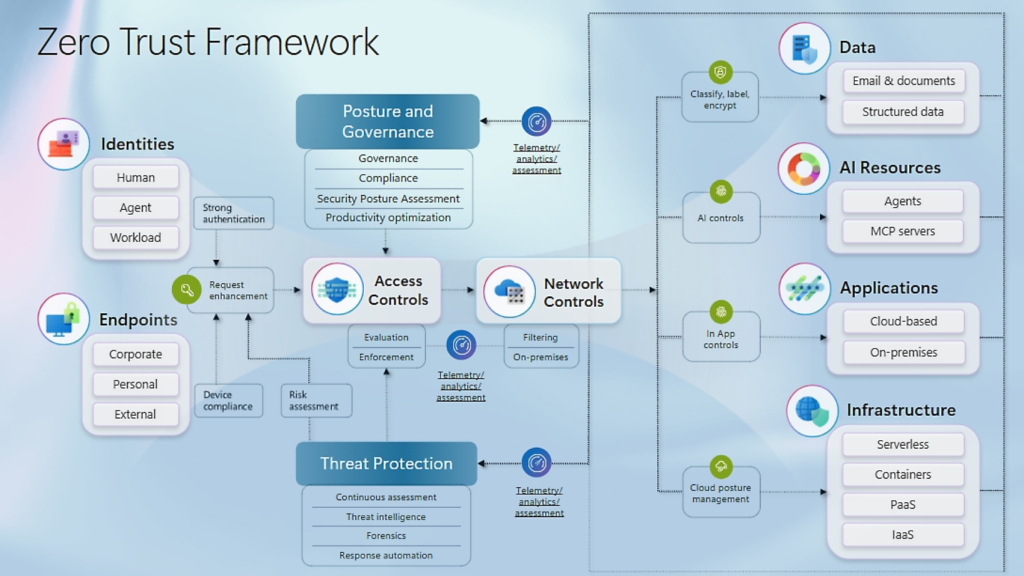
That’s what Zero Trust is about. And it’s not a product, nor a feature you can enable. It’s a design principle: “Never trust, always verify, assume breach”.
Microsoft’s own definition is quite direct: Zero Trust is a security strategy built on three core principles. Verify explicitly, use least privilege access, and as mentioned: assume breach. Those three things, applied consistently across your cloud design, your operations, and increasingly your AI tooling, are what separate organisations that are prepared from those that are not.
Zero Trust matters in an AI world
The threat landscape has drastically shifted. Attackers are no longer primarily trying to break through your firewall. They’re targeting people, identities and exploiting misconfigurations that were never designed with a breach in mind.
We’ve seen this in many environments. Overprivileged service principals, resources deployed manually in the portal with no audit trail. A key vault that’s technically “private”, but accessible from half the subscriptions in the tenant. None of these are dramatic failures on their own. Combined, they create a lot of exposure.
And then AI arrives. Claude, Gemini, Copilot. Agents calling your data. Suddenly you have non-human identities making decisions and accessing resources at a scale and speed no human team can manually review. If your foundation wasn’t Zero Trust before, it really needs to be now.
What it looks like in your cloud design
In Azure, Zero Trust shows up in specific design decisions. Identity is always the first control plane. Every user, every service, every agent needs an identity, and that identity should have only the access it actually needs. Managed Identities instead of stored credentials. Conditional Access policies that actually enforce MFA, not just for users but for access to Azure management APIs. Privileged Identity Management so permanent admin roles aren’t sitting there waiting to be compromised.
We wrote about how Maester can continuously validate your Entra ID and Conditional Access configuration. The point isn’t the tool itself, it’s the principle: your identity configuration should be treated as code, tested, and continuously verified. Drift is often how incidents start.
Networking is the second layer. Private endpoints for your services. Absolutely no public access on storage accounts, Key Vaults, or databases unless there is a very good reason. NSGs and Azure Firewall that segment your workloads. Hub-and-spoke topologies in your Landing Zone that enforce boundaries by design.
The third layer is infrastructure configuration itself. Policies enforced at management group level. Resources deployed through pipelines, and never via the portal. If people in your team are still clicking away in the Azure portal to deploy production resources, they are creating configuration drift. Infrastructure as Code is how you enforce it consistently.
Where AI tooling changes the game
AI agents don’t just query data, they also act. They call APIs, read documents, write to datastores and send messages. A misconfigured agent one with too much access, is a potential risk.
Microsoft’s guidance on securing AI workloads extends the same Zero Trust principles to agents and models. Give every agent an identity. Scope its permissions to exactly what it needs. Disable public access to AI endpoints. Use private endpoints and Azure Virtual Networks so your AI traffic stays on the backbone, not the public internet. Log everything.
Prompt injection is also a real attack vector. An agent that processes external content can be manipulated if there are no guardrails in place. Azure AI Content Safety and Prompt Shields sit at the network layer and enforce those guardrails consistently, without requiring code changes in every application.
There’s also the question of the data the AI accesses. Microsoft Purview’s sensitivity labels extend to Microsoft Fabric and AI workloads. The same protections you apply to your structured data in a data warehouse can follow that data into AI pipelines. Labels and access controls should travel with the data, not stop at the warehouse boundary.
Operationally, what does this mean
Zero Trust requires continuous verification. The gap between your documented security posture and your actual security posture grows every week you are not actively measuring it. The Azure Well-Architected Framework’s Security pillar gives you a solid structured baseline. It covers identity, networking, data, and operational security as interconnected design concerns. If you haven’t done a WAF security review recently, it’s worth the time.
Our take
Zero Trust is not a project with a finish line. It’s a design philosophy that has to be embedded in how you build, deploy, and operate your cloud environment.
The organisations that get this right aren’t necessarily the ones with the biggest security budgets either. They’re the ones that design for least privilege from the get-go, automate their infrastructure so configuration is auditable, treat identity as a control plane, and extend those same habits to their AI tooling.
In a world where non-human identities increasingly take action on your behalf, “never trust, always verify” is not a principle you can leave on the drawing board.
If you want to know where your environment actually stands, we run Azure Assessments based on the Microsoft Well-Architected Framework. It’s a good place to start. Get in touch.