


For years, the conventional wisdom has been that on-prem DevOps is on its way out. Microsoft pushed back on that assumption hard when Azure DevOps Server hit GA back in December. Four months on, it’s worth stepping back and looking at what that release actually meant, because the shift it represents is bigger than it looked at the time.
Three things changed at once, and together they tell a clear story: on-prem is sticking around.
What changed
The year label is gone from the name. It’s just “Azure DevOps Server” now. No more guessing whether your “ADO Server 2022” install is still supported.
The lifecycle policy moved from Fixed to Modern. There’s no fixed end-of-support date anymore. As long as you stay current with updates, you’re supported. Same model as Microsoft 365 and most of Microsoft’s SaaS products. This is the first time in almost two decades the product has moved off a fixed clock. Every version from TFS 2005 through Azure DevOps Server 2022 ran on the standard 10-year Fixed Lifecycle (5 years mainstream, 5 years extended).
The release cadence moved from two-year major releases to continuous updates. Patch 1 shipped in February, Patch 2 in March. That’s the new rhythm.
Why this is a vote of confidence
Microsoft doesn’t put products on Modern Lifecycle when they’re winding them down. They also committed to a three-year advance retirement notice if they ever decide to kill the product, well above the 12-month minimum that Modern Lifecycle requires. You don’t write that into an announcement for something you’re sunsetting.
The real reason is simple: Microsoft has a large base of regulated customers who can’t (fully) move to the cloud. Banks, defense, healthcare, government, anyone caught in the EU’s digital sovereignty push (a topic we dive deeper into in Azure Sovereign Solutions: Europe’s Turning Point in Cloud Control). Walking away means handing them to GitLab or GitHub Enterprise Server. So they’re staying in the game.
Where it fits: Server vs Cloud vs GitHub
Microsoft now has three overlapping DevOps platforms. Here’s how they actually line up:
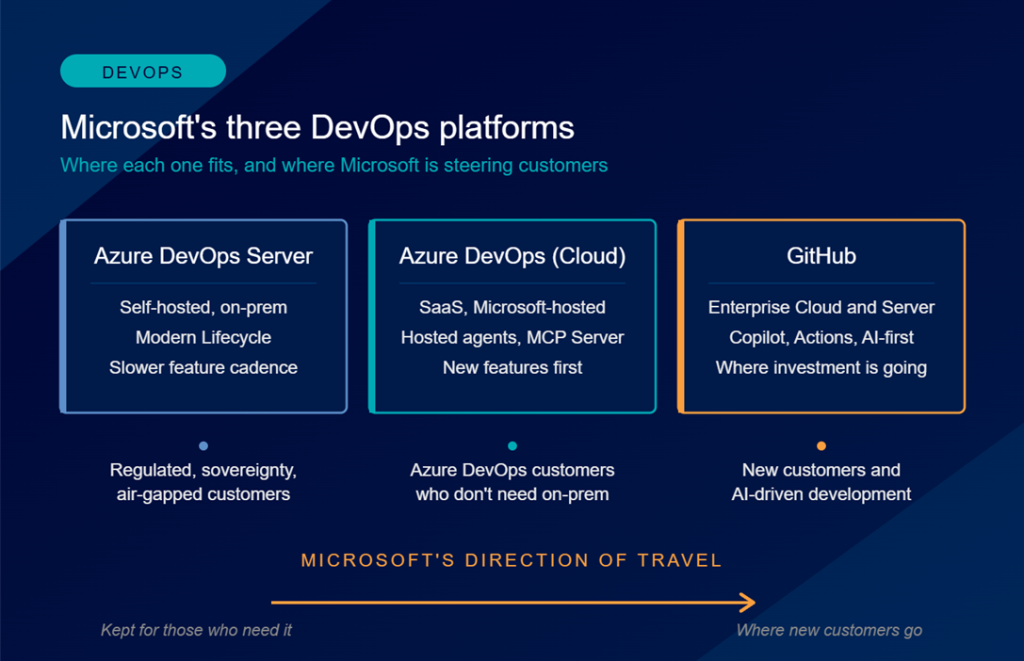
Azure DevOps Server is the self-hosted option. You run it on your own infrastructure, with your own SQL Server, behind your own firewall. Best for customers with hard data residency, sovereignty, or air-gap requirements. Gets features later than the cloud version, and some things (like PublishPipelineArtifact) never arrive because they’re architecturally tied to Azure.
Azure DevOps (Cloud) is the SaaS version, officially called Azure DevOps Services but nobody actually says that. Same Boards, Repos, Pipelines, Test Plans, and Artifacts, plus Microsoft hosted build agents, the remote MCP Server for AI agents, and new features that land here first. The right choice for enterprises invested in the Azure DevOps workflow who don’t need self-hosting.
GitHub (Enterprise Cloud and Enterprise Server) is where Microsoft’s real investment is going. Copilot, Actions, and the whole AI developer story are GitHub first. This is the platform Microsoft is building the future on.
The direction of travel is clear. New customers starting fresh are being steered toward GitHub. Cloud is the steady middle ground for existing Azure DevOps customers. Server is for those who need it, and now has a stable long-term home.
GitHub is where Microsoft wants you to go, Cloud is where most of their Azure DevOps customers already live, and Server is where they keep the customers who genuinely can’t move. All three are supported. None of them are going away any time soon.
What to do now
Check your TFS support dates. TFS 2015 ended extended support in October 2025, so if you’re still there, upgrade now. TFS 2017 runs until January 2027, TFS 2018 until January 2028. You’re not forced to jump to the new GA immediately, but you should plan the path.
Put patch management on a monthly rhythm. The original GA release had a group membership bug that Microsoft flagged in late February, requiring a SQL mitigation script before Patch 2 fixed it properly in mid March. Test in non-prod first.
Update compliance docs to reflect the Modern Lifecycle Policy. “Supported as long as we stay current” is a different audit answer than “supported until date X”.
Track build numbers yourself. Microsoft stopped publishing them prominently. Fokko Veegens maintains a community GitHub repo that has every build and patch.
Microsoft didn’t just rename ADO. They told the market that on-prem DevOps has a future, and backed it with a real lifecycle commitment. For European enterprises with good reasons to stay self-hosted, that’s genuinely good news.