


When you optimise your Azure platform for cost and performance, you are usually improving its carbon footprint as well. Until recently, that part was just not visible. What is often missing is a clear way to see what your environment is actually doing in terms of emissions.
Microsoft has finally solved this question by building Carbon insights into platform itself. Over the past couple of years, environmental impact has moved from separate reporting into a native Azure feature.
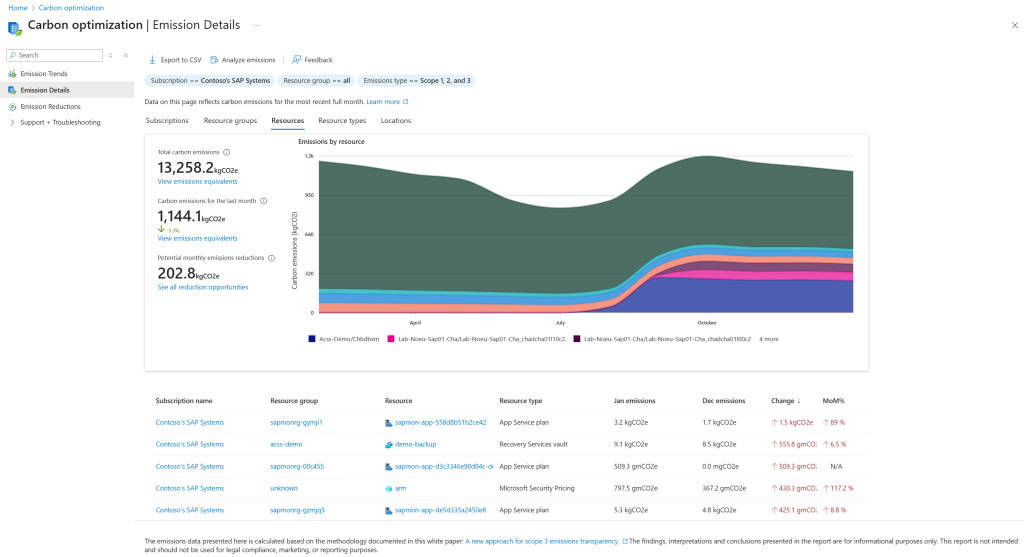
With Carbon optimization, you can now look at emissions in the same place where you manage your resources, and it is a lot more practical than it sounds.
What Carbon optimization is actually looking at
Carbon optimization gives you insight into emissions based on how your Azure resources are used. You can view trends over time, filter by subscription or resource group and break things down by service type. You will also see a split between operational emissions and embodied emissions. In simple terms, what it takes to run your workloads versus the impact of the infrastructure behind them.
You do not need to go deep into that distinction to get value out of it, but it helps to understand why certain services show a higher impact than others.
The main difference compared to earlier approaches is where this sits. It is part of the Azure portal. You are not switching tools or exporting data. It is right there next to cost and resource management.
Why Carbon optimization is useful
If you already spend time looking at cost, this will feel familiar. You look for resources that are not being used, workloads that are too large for what they do, or environments that run longer than needed. Carbon optimization highlights those same situations, but shows the impact in emissions.
That makes it easier to explain and prioritise changes. Not just from a cost perspective, but also from a broader responsibility angle that many organisations are now dealing with. For business and product owners, this helps bring sustainability into existing discussions without turning it into something separate.
What you can do with it
Carbon optimization is quite direct in how you use it. You can see which subscriptions or workloads contribute most to your footprint, so you know where to look first. You can drill into resource types and spot patterns, such as virtual machines that run continuously while only being used part of the day.
You get recommendations that link directly to changes. Rightsizing compute, removing unused resources or adjusting how workloads are scheduled. Each recommendation shows the potential reduction and often the cost impact as well.
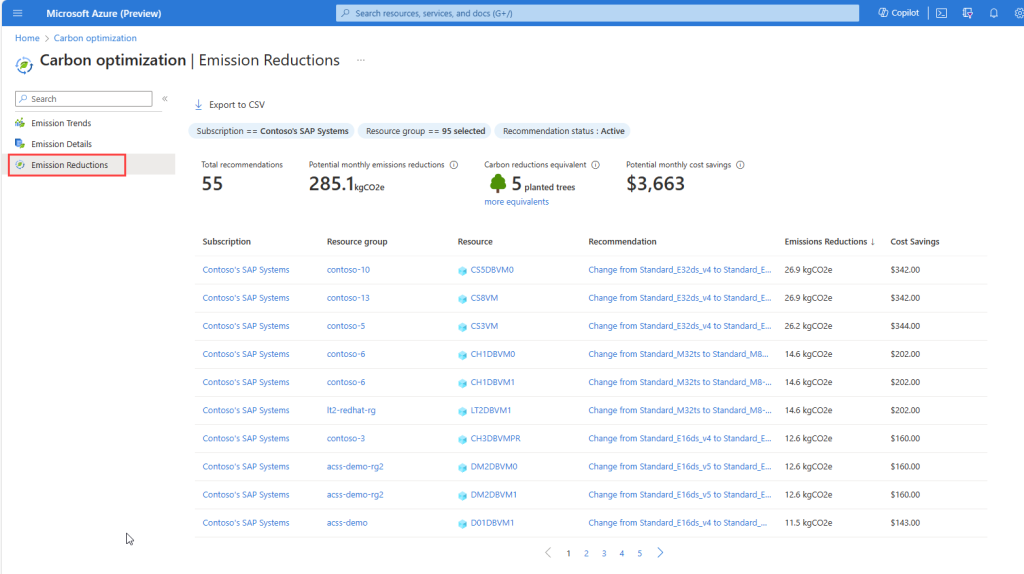
That combination is what makes it practical. You are not just looking at numbers, you can act on them.
How Carbon optimization fits with the way you already work
If you are already working with FinOps, this fits naturally into that approach. You are already looking at usage and efficiency. Carbon optimization builds on the same data. If this is new, it can still be a straightforward starting point. It gives you a way to understand how your platform is used without needing extra tooling.
A few things are worth keeping in mind: Not every Azure service is included yet and the data will continue to improve. The biggest improvements are often quite simple. You do not need to treat this as a separate initiative. It fits into existing reviews and optimisation work.
Accessing carbon data via API
For teams that want to go beyond the portal, Microsoft also exposes carbon data through a REST API. The Carbon Service API allows you to retrieve emissions data programmatically, scoped to your subscriptions and time ranges. And of course you can use a Python script to export Azure Carbon optimization emissions data as JSON output.
This makes it possible to integrate carbon insights into your own dashboards, reporting pipelines or internal platforms. For example, combining carbon data with cost, usage or business KPIs in a single view, or feeding it into existing FinOps or governance processes.
In practice, this is where it becomes much more useful. You can now treat carbon data in the same way as any other operational metric in your platform.
If emissions are becoming part of your work, this is a practical place to start. If you want to see how this fits into your own Azure setup, you can contact us here.